Healthcare
Enterprise Web App
Responsive
Automedsys Claims — Redesigning an insurance claims platform for the people who use it every day
A full responsive redesign of the Automedsys Claims Management platform — a complex, data-dense enterprise tool used by hospital administrators and doctors to submit, track, and manage insurance claims at scale.
Role
Solo Product Designer
Platform
Responsive
Tools
Figma
Timeline
Ongoing
OVERVIEW
What Automedsys Claims is
"Designing for enterprise tools requires a different discipline than consumer apps. The question is never just 'does this look good?' — it's 'can a billing administrator process 50 claims in a morning without making mistakes?'"
Automedsys is an Electronic Health Records (EHR) platform serving hospitals and healthcare providers. The Claims Management module is the financial backbone of the system — it's where hospital administrators and doctors submit insurance claims to payers, track claim statuses, manage patient billing, process payments, and generate financial reports.
This isn't a consumer app. It's a tool that healthcare professionals use for hours every day to manage thousands of claims, hundreds of patients, and millions of naira in billing. When it works well, it's invisible. When it doesn't, it costs real money and real time.

THE PROBLEM
What was wrong with the original
The existing Automedsys Claims platform had grown organically over time — features added as needs arose, without a consistent design vision holding it together. By the time the redesign was commissioned, three distinct problems had accumulated.
1
Outdated visual design
The interface looked old and unpolished — inconsistent typography, mismatched spacing, and a visual system that hadn't kept pace with the maturity of the product. For a platform handling financial data, visual trust matters. An interface that looks neglected signals to users that the product is neglected.
2
Poor UX flows. Too many steps, confusing navigation
Key workflows like creating a new transaction, scheduling claims, and processing payments required navigating through too many separate screens with unclear progression. Users had to hold too much context in their heads. where they were, what they'd done, what was left to do.
3
Not responsive. Completely broken on mobile and tablet
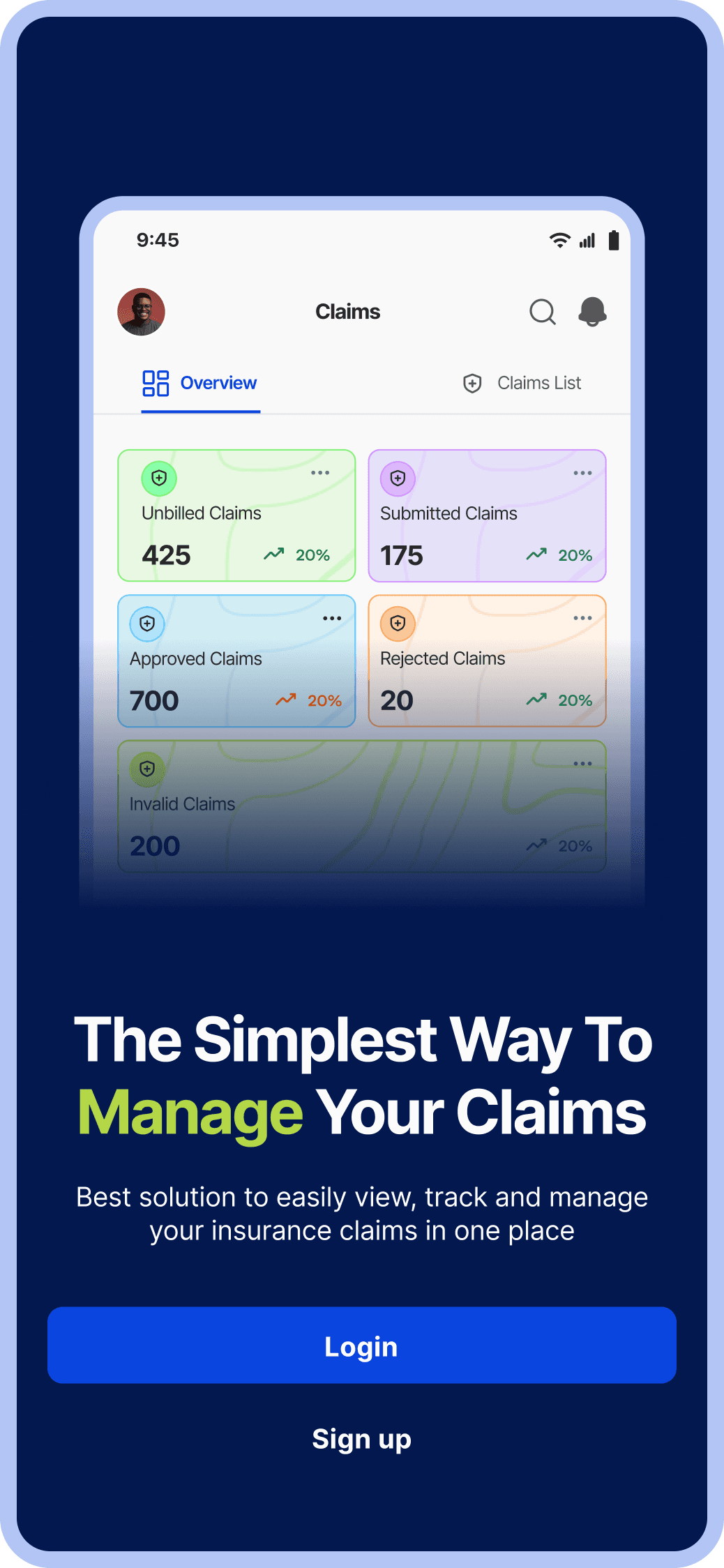
Hospital administrators and doctors don't only work at desks. They move between wards, offices, and rooms often checking or updating records on a tablet or phone. The existing platform had no mobile consideration at all. On smaller screens it was effectively unusable.
SCOPE
What was redesigned
Home Dashboard
A proper dashboard that shows key summation of all the sections. 4 KPI cards (Payment Received, Patients without Insurance, Rejected Claims, Unbilled Claims) and other key widgets something that the existing design didn’t have
Patient Section
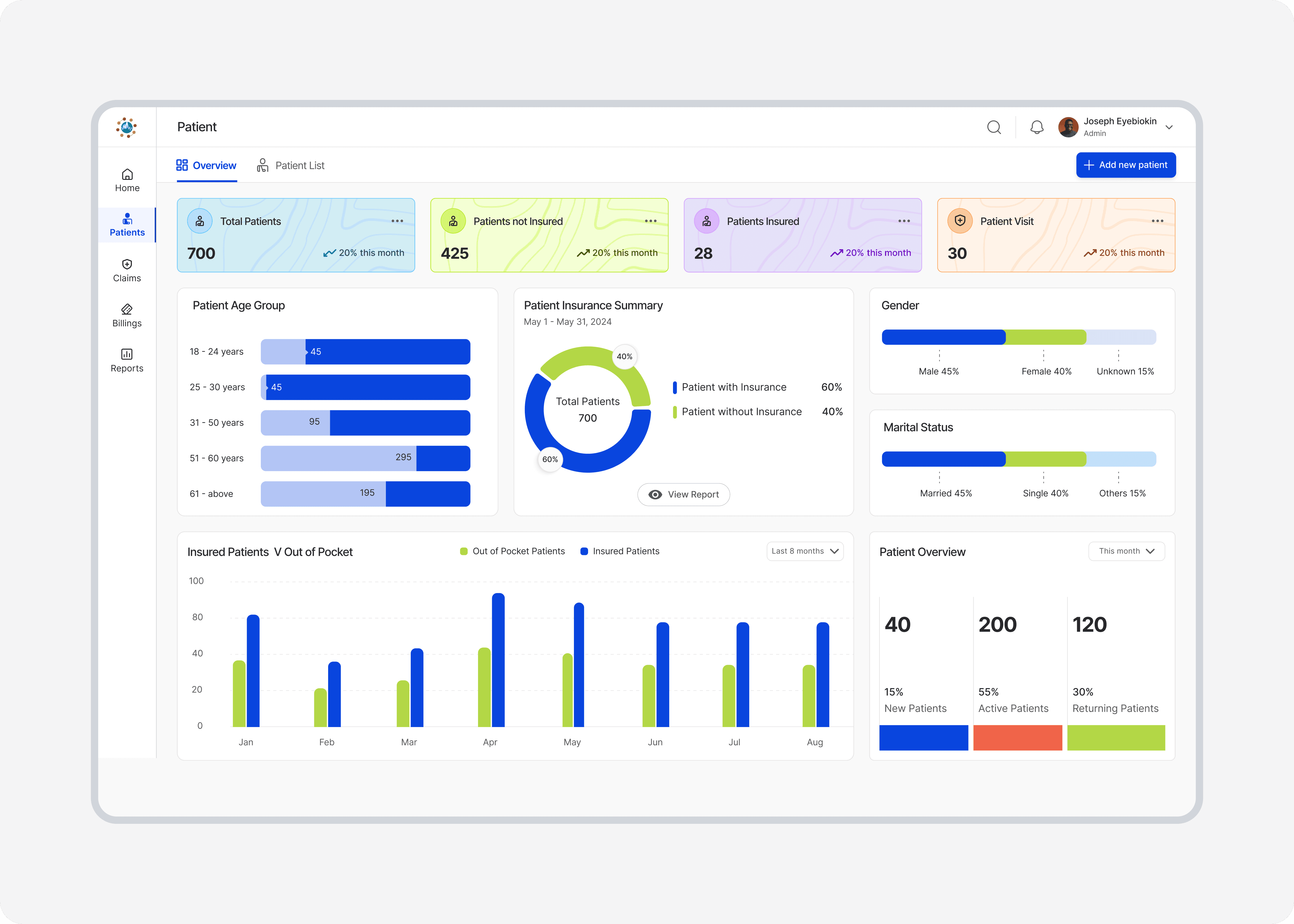
Created a redesign that had more structure. an overview dashboard with patient demographics, insurance breakdown, and financial charts, and a Patient List table with sortable columns, bulk selection, multi-action toolbar, and export controls.
Claims Section
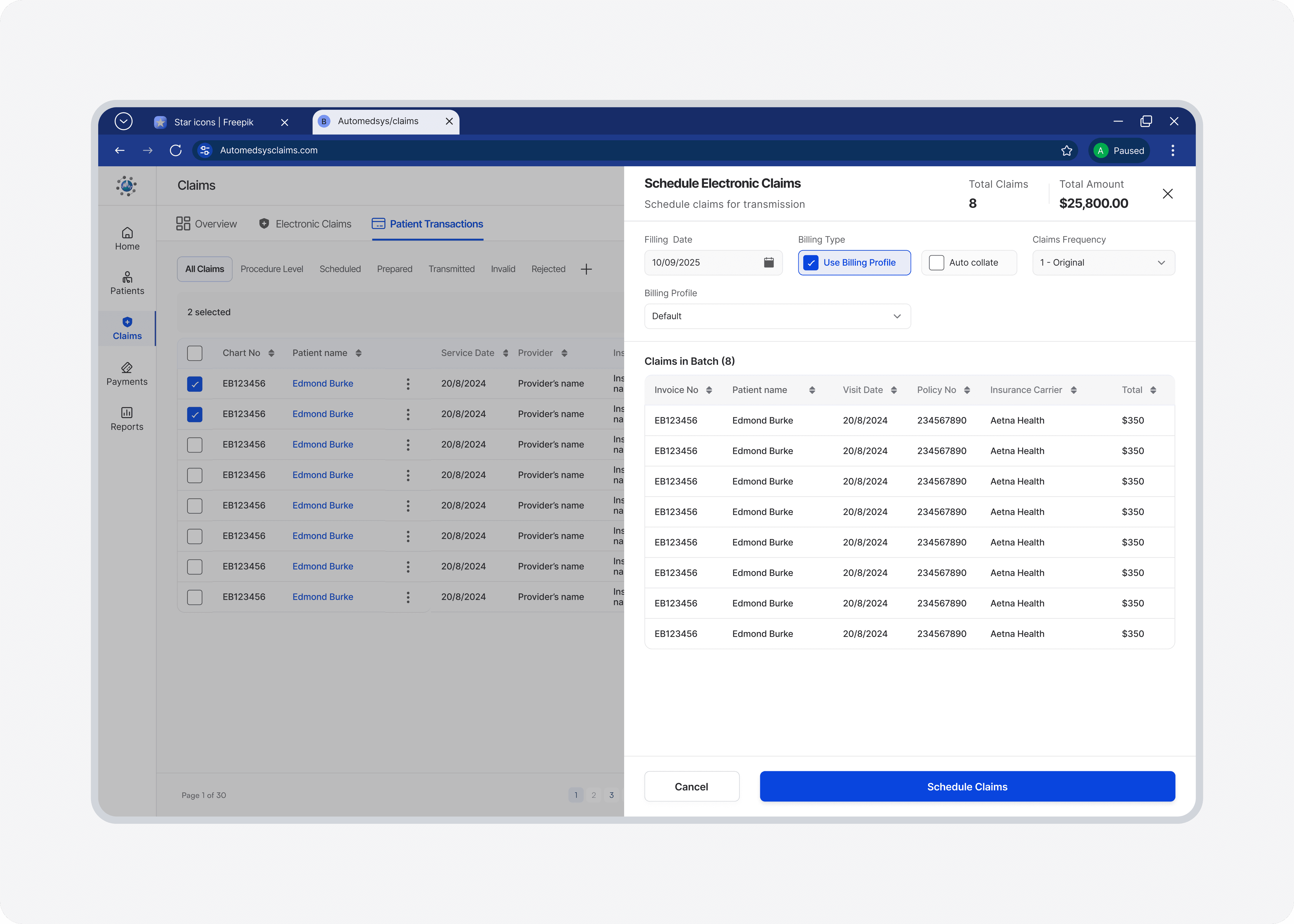
Redesigned the claims section. An overview page with a patient transaction flow (From All claims - scheduled to transmitted claims. A proper flow where the user can initiate claims transaction.
Transaction Flow
Created a detailed transaction flow. A multi-step: find patient → enter details → diagnoses → billing → submit), Import Encounter flow, and the Patient Transaction Flow with status badge management (Accepted, Denied, Pending, Error).
Billings & Payments
An overhaul redesign of the billings section which contains detailed flow for ledger, payment, remittances and statement. An overview section where user can see relevant charts, and quick tabs
Responsive Layout
Mobile and tablet adaptations for all key sections — collapsible sidebar navigation, responsive data tables, stacked card layouts, and mobile-optimised modals throughout.
Home Dashboard Flow
Patient Section

Patient Claims Transaction Flow


DESIGN CHALLENGES
The hard problems in enterprise design
1
Bulk actions on data-dense tables
Administrators frequently need to act on multiple claims simultaneously — scheduling a batch of claims, exporting a selection, or bulk-submitting prepared claims. The redesign introduces checkbox selection on every table row with a bulk action toolbar that activates when rows are selected. The Schedule Claims modal shows the full selected claim list with amounts, giving users confidence they're acting on the right records before committing.
2
Multi-step flows that don't lose the user
The Create New Transaction flow spans multiple steps — finding a patient, entering encounter details, adding diagnoses and procedure codes, reviewing billing, and submitting. Each step builds on the last. The redesign addresses this with a persistent patient context header that stays visible across all steps (name, ID, key info) so the user never loses track of who the transaction belongs to, and clear step progression that shows where they are and what's left.
3
Making complex financial data readable
The Billings Overview carries a significant amount of financial information — total income vs expenses over 9 months, insurance payment breakdowns, claim categories with dollar amounts, and KPI cards with trend indicators. The redesign uses a strict visual hierarchy: large numbers for KPIs, colour-coded bar charts with a clear legend, and a structured claims category list with right-aligned amounts — all within a single consistent layout that lets users read across dimensions without losing their place.
4
Responsive design for data tables
Data tables are notoriously difficult to make responsive. A 9-column table that works on a 1440px desktop cannot simply scale down to a 360px phone. The mobile redesign addresses this by prioritising the most critical columns (name, status, amount, date) and collapsing secondary data into an expandable row or detail drawer — so mobile users get the information they need without horizontal scrolling or text that's too small to read.
REFLECTION
What this project taught me
The Automedsys Claims redesign was the most technically demanding design project in my portfolio — not because of the visual complexity, but because of the information complexity. Designing for a platform where every table column, every modal field, and every status badge carries real-world financial and clinical consequences forced a level of precision I hadn't needed in consumer product work.
The biggest lesson was this: in enterprise design, simplicity is even harder to achieve than in consumer design — because you cannot remove information. A consumer app can guide a user step by step and hide complexity behind progressive disclosure. An enterprise billing tool has to put the complexity on screen, because the people using it need to see all of it. The craft is in making that complexity feel navigable, not overwhelming.